Sign in to X-Protection and understand roles
Sign in with a two-factor code and see which menus your role gives you.
Open X-Protection
Open protection.arabianmail.com and sign in with your e-mail address, password and the six-digit code from your authenticator app. New users first accept an invitation link and choose a password.
Find your menus
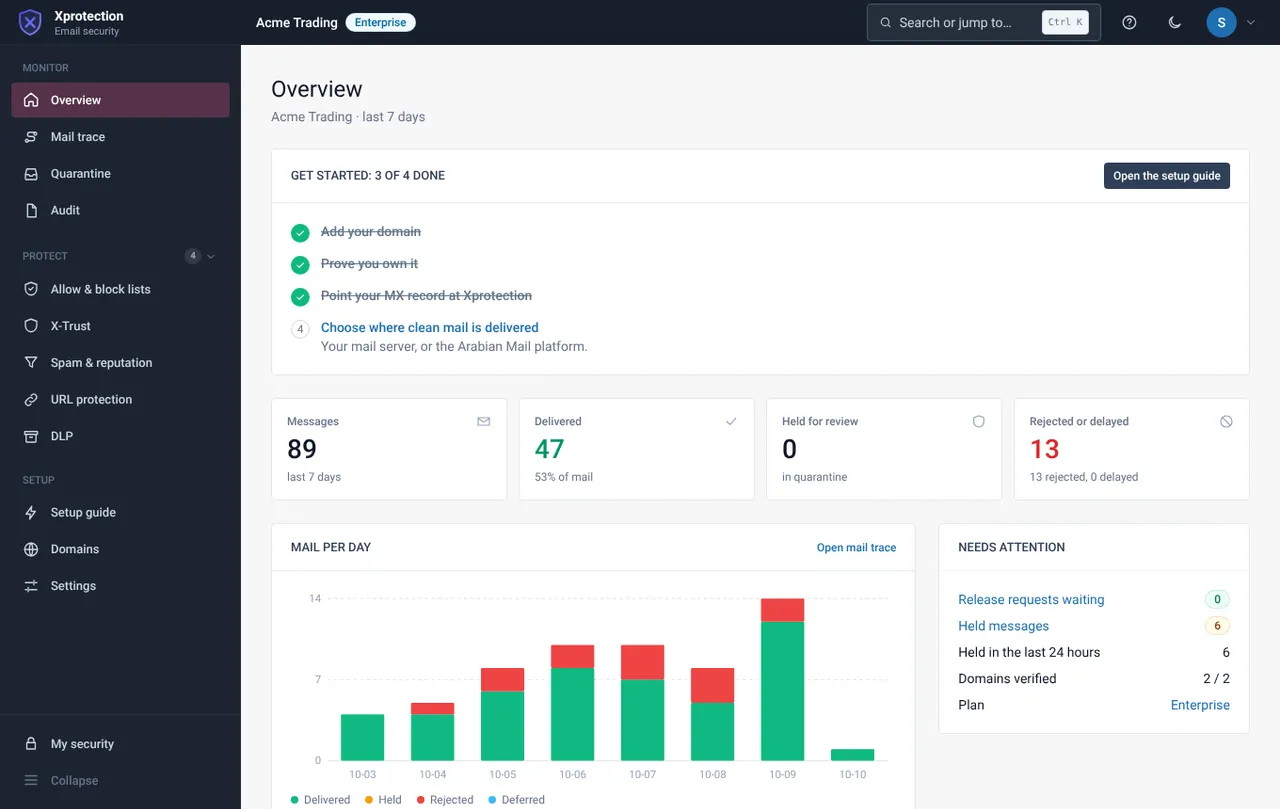
The menu has three groups: Monitor, Protect and Setup. Which pages appear depends on your role and your plan. A page for a feature that is not in your plan stays hidden.
Use search and shortcuts
Use the search box at the top to jump to any page. Press ? to see keyboard shortcuts.
Customer roles
| Role | What it is for |
|---|---|
| Owner | Everything, including users, roles, recovery and the audit log |
| Security admin | Settings, policies, rules and dashboards |
| Recovery officer | Approves or requests recovery of archived mail |
| Helpdesk | Dashboards and quarantine handling |
| Auditor | Read-only access to dashboards and the audit trail |
| Viewer | Read-only dashboards |
Related guides
Connect your domain: the setup guide and MX record
Five steps from adding your domain to checking that mail flows through X-Protection.
X-ProtectionInvite people and manage roles
Invite users, reset a password or two-factor, and build custom roles.
X-ProtectionRead the overview page
See the last seven days of mail at a glance and what needs attention.
Still need help?
Tell us what you were trying to do and what you saw on screen. We will help you finish it.