X-ProtectionFor: Security administrators3 min readUpdated
Read the overview page
See the last seven days of mail at a glance and what needs attention.
Open Overview
Choose Monitor, then Overview.
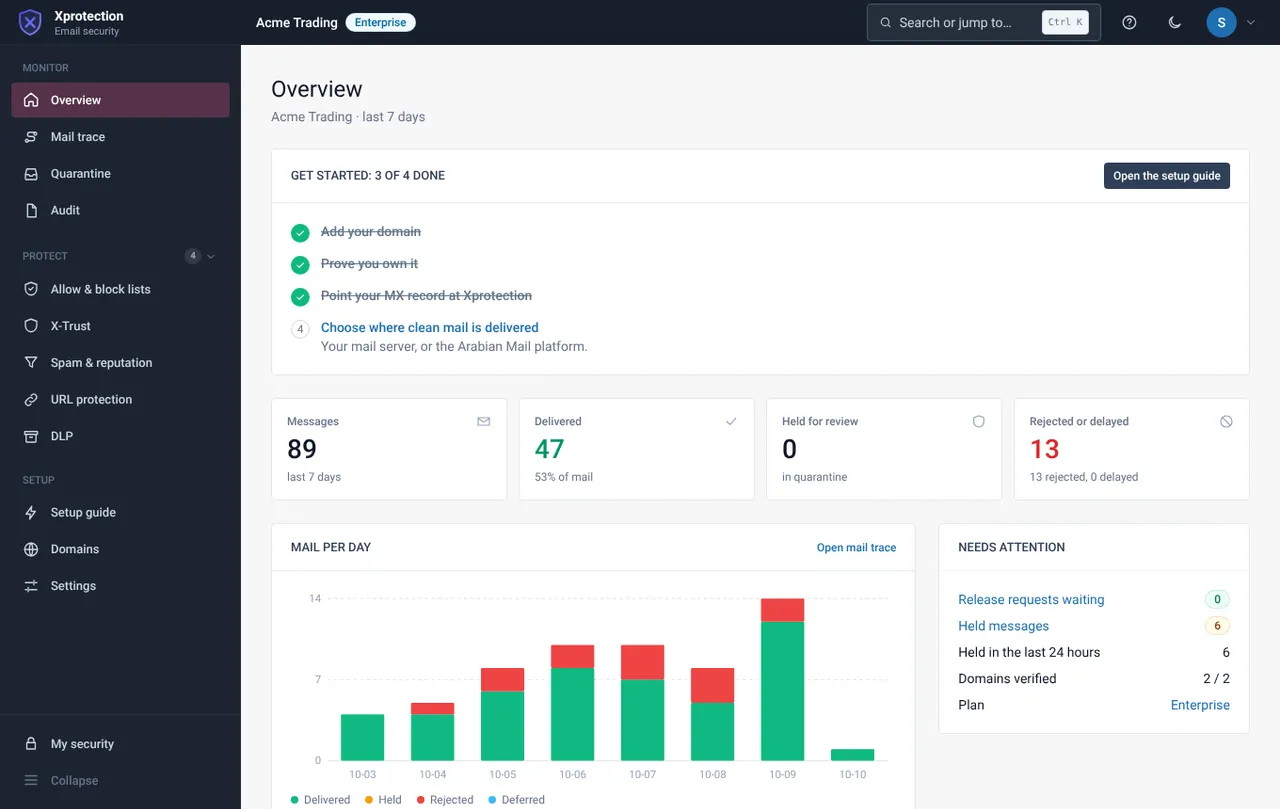
Read the tiles
The tiles show messages seen, delivered, held for review, and rejected or delayed in the last seven days.
Read the chart
The mail-per-day chart splits delivered mail, spam, rejected and held. A spike in one colour is worth a look in Mail trace.
Work through “Needs attention”
Each item has a link straight to the page where you can act.
Related guides
X-Protection
Trace a message: what happened to this email
Search by sender, recipient, subject or IP and open a row for the full story.
X-ProtectionReview quarantine and release a message
See what was held and why, then release or delete it.
X-ProtectionUse the audit trail
One searchable record of sign-ins, changes, filtered mail, releases and support access.
Still need help?
Tell us what you were trying to do and what you saw on screen. We will help you finish it.