Mail Admin (Client Portal)For: Organisation administrators4 min readUpdated
Help staff connect phones and mail apps
Share server settings, an iPhone profile and the My Account address with your people.
Open Device set-up
Choose Users, then Device set-up.
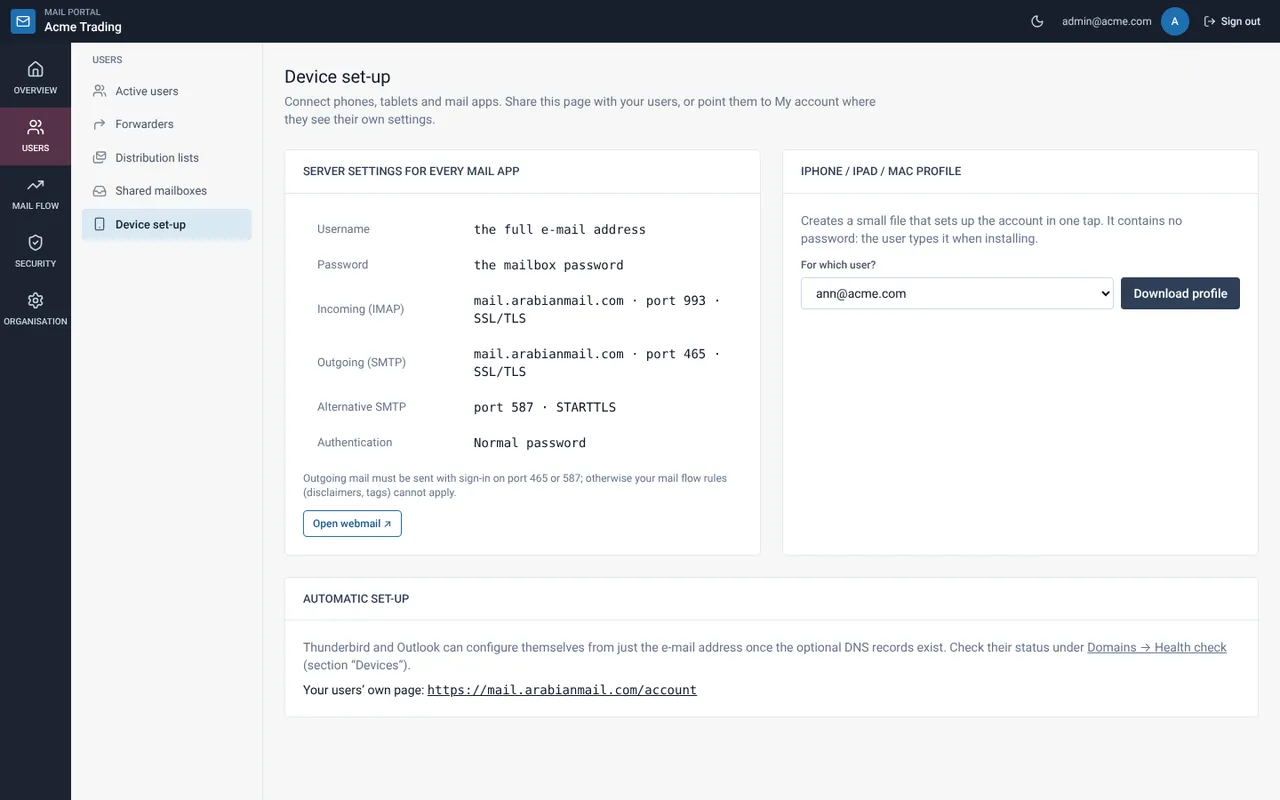
Share the server settings
The table lists the incoming and outgoing servers, ports and encryption for every mail app.
Create an iPhone or Mac profile
Pick the user and select Download profile. The file contains no password.
Point staff to My Account
Under “Automatic set-up” the page shows your users’ own page. Staff can see their own settings there.
Related guides
Web Mail Portal
Set up your phone or mail app
Add your mailbox to an iPhone, Android phone, Outlook or Thunderbird with the right server settings.
Web Mail PortalMail server settings (IMAP, SMTP and ports)
The technical reference for connecting any mail client: protocols, ports, encryption and authentication.
Still need help?
Tell us what you were trying to do and what you saw on screen. We will help you finish it.