Mail Admin (Client Portal)For: Admins and helpdesk4 min readUpdated
Find out what happened to a message (message trace)
Search by sender, recipient and time to see the delivery result.
Open Message trace
Choose Mail flow, then Message trace.
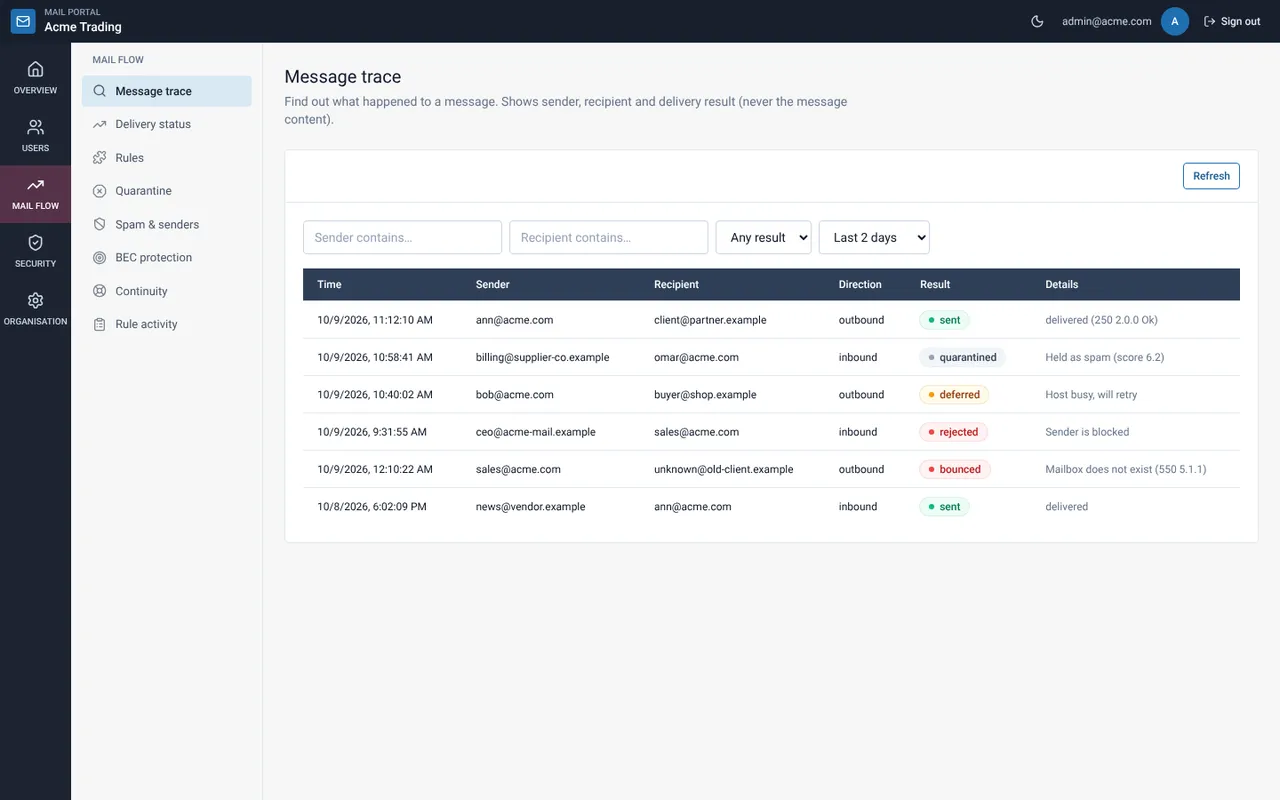
Narrow the search
Type part of the sender or recipient, pick a result (such as bounced) and a time window of 24 hours up to 30 days. The list refreshes as you type.
Read the result
Each row shows time, sender, recipient, direction, result and details. The trace never shows message content.
Results and what to do
| Result | Meaning | Action |
|---|---|---|
| sent | Delivered to the destination | None |
| deferred | The other side is busy; we keep retrying | Usually none. Wait |
| bounced | Permanently refused (for example the mailbox does not exist) | Check the address with the sender |
| rejected | Refused at the gate (blocked sender, spam) | Check lists and spam settings |
| quarantined | Held for review | Open Quarantine |
Related guides
Mail Admin (Client Portal)
Check delivery status
See how many messages were delivered, deferred, bounced or rejected, and the top problems.
Mail Admin (Client Portal)Review quarantined messages
See what was held, why, and release or delete it.
Mail Admin (Client Portal)Tune spam filtering and trusted senders
Choose how strict the filter is and which senders are always trusted or blocked.
Still need help?
Tell us what you were trying to do and what you saw on screen. We will help you finish it.