Mail Admin (Client Portal)For: Organisation administrators4 min readUpdated
Add portal admins and choose their roles
Give colleagues portal access as Admin, Helpdesk or Read-only.
Open Portal admins
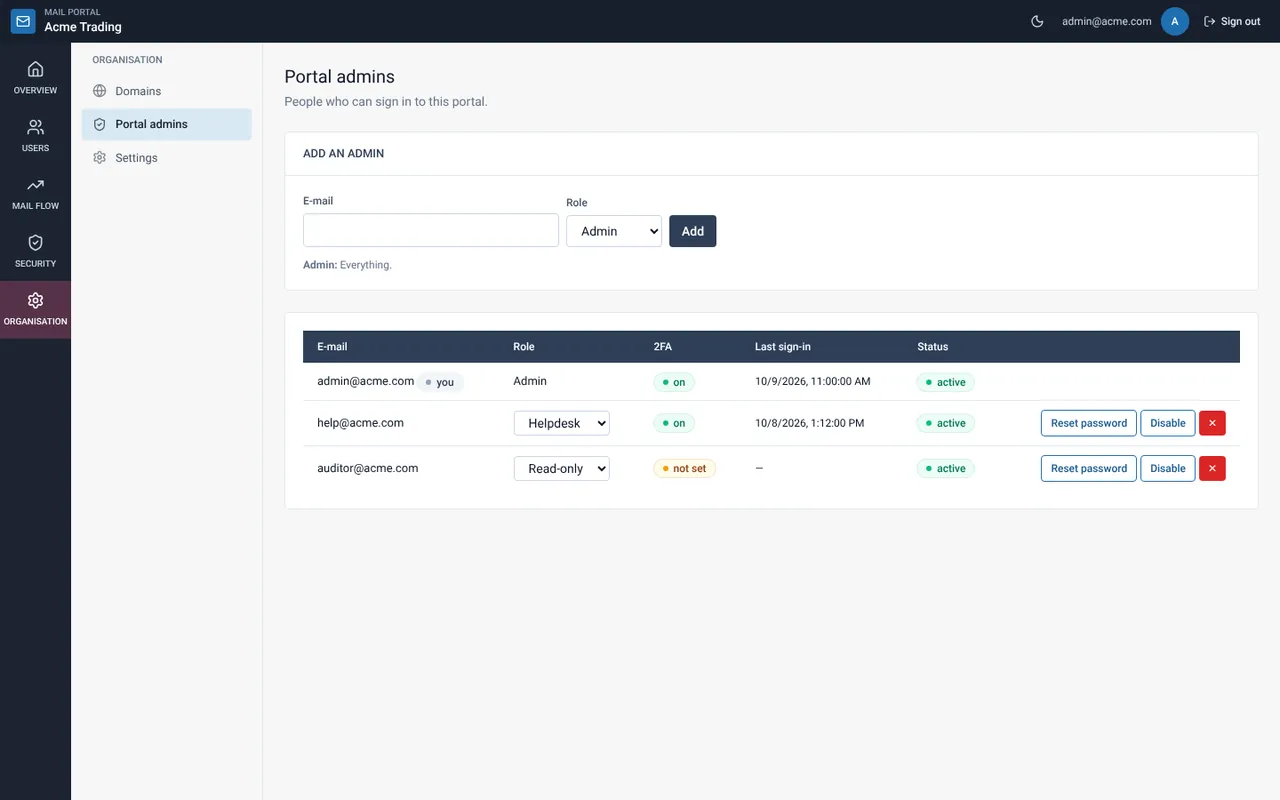
Choose Organisation, then Portal admins. Only Admins can add people.
Add an admin
Enter the e-mail address, choose the role (the help line under the form explains it) and select Add.
Hand over the temporary password
A temporary password is shown once. Give it to the person. At first sign-in they must choose a new password and set up two-factor.
Change, disable or remove
Use the role drop-down to change a role, Reset password for a locked-out person, Disable to stop access, or ✕ to remove.
Related guides
Mail Admin (Client Portal)
Portal roles: what Admin, Helpdesk and Read-only can do
A table of what each portal role can and cannot do.
Mail Admin (Client Portal)First sign-in to the portal: new password and two-factor
Your first sign-in has two required steps: choose a new password, then set up a six-digit code.
Still need help?
Tell us what you were trying to do and what you saw on screen. We will help you finish it.