Mail Admin (Client Portal)For: Organisation administrators5 min readUpdated
Quarantine settings: digest, scan, limits and retention
Choose what people are told, how mail is scanned before release and how long it is kept.
Open the Settings tab
Open Quarantine and select Settings.
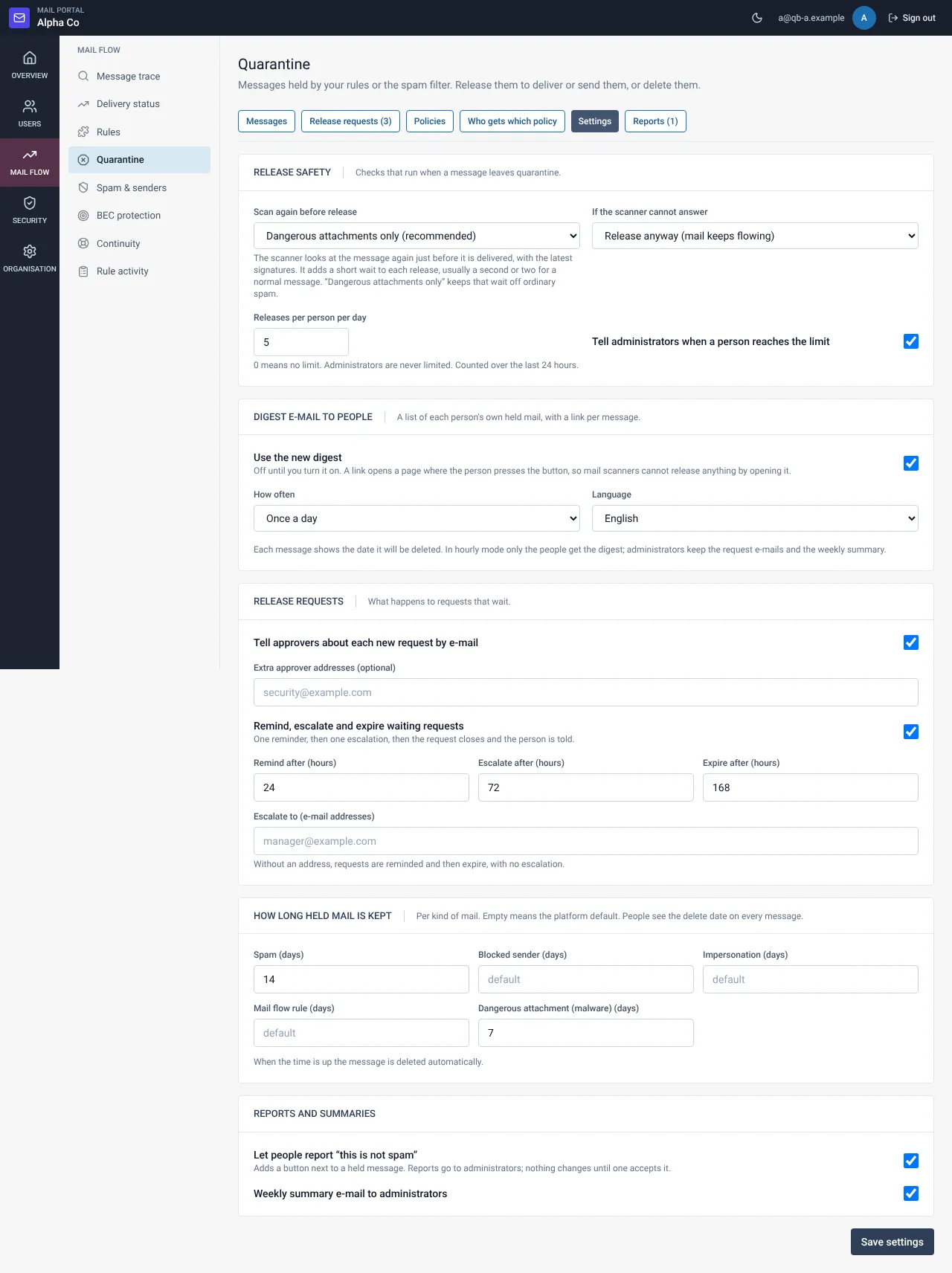
Choose your settings
Everything starts off, so nothing changes until you turn it on. See the table for each option.
Select Save
Settings are saved all together. Each change is written to the audit log.
Settings
| Setting | What it does | Default |
|---|---|---|
| Use the new digest | One safe link per message, daily or hourly, English or Arabic | Off |
| Scan again before release | Off, dangerous attachments only (recommended) or every message; fail open or closed | Off |
| Release limit per person per day | Counts releases in the last 24 hours; admins are never limited | 0 (no limit) |
| Request automation | One reminder, one escalation, then expiry | Off |
| Days to keep, per kind | 1 to 365 days, then deleted automatically | Platform default |
| “This is not spam” reports | Shows people a report button | Off |
| Weekly summary e-mail | Sends the report to addresses you list | Off |
Still need help?
Tell us what you were trying to do and what you saw on screen. We will help you finish it.