Read the dashboard
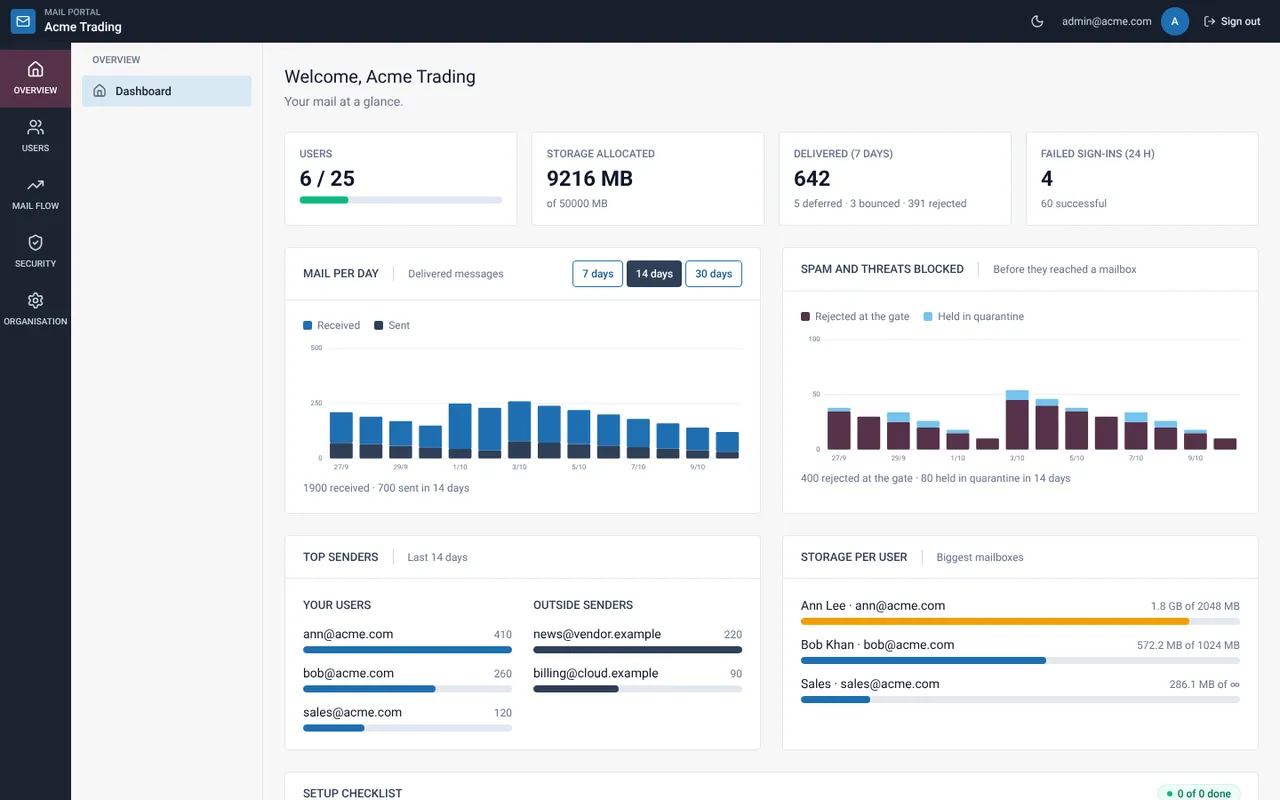
The dashboard answers one question: is our mail healthy? Here is how to read each part.
Check the top row
The four tiles show users against your plan limit, storage allocated, messages delivered in 7 days and spam blocked in 24 hours.
Read “Mail per day”
Switch between 7, 14 and 30 days. Received and sent messages are stacked per day, so a sudden jump stands out.
Read “Spam and threats blocked”
These are messages rejected at the gate or held in quarantine before reaching a mailbox.
Look at top senders and storage
The busiest users and outside senders are listed, and the largest mailboxes against their quota. A warm colour means a user is close to the limit.
Finish the setup checklist
The checklist at the bottom lists what is left for a fully set-up organisation, such as two-factor and domain checks.
Related guides
Pause sending when a mailbox may be compromised
Stop a user from sending while they can still receive mail, then fix the cause.
Mail Admin (Client Portal)Set up alerts
Get an e-mail when a mailbox is nearly full, sign-ins fail or a mailbox may be compromised.
Mail Admin (Client Portal)Check delivery status
See how many messages were delivered, deferred, bounced or rejected, and the top problems.
Still need help?
Tell us what you were trying to do and what you saw on screen. We will help you finish it.